How do I donate to a registered Empower Participant?

Last updated: Apr 22, 2026
7272
views

-
- If you wish for your donation to be credited towards a registered participant, you will need to place the donation directly on their individual or team fundraising page. You can search for the fundraiser here participating individual or team fundraising page. You can search for the participant or team the City’s Empower Website. Once you are on the Event website:
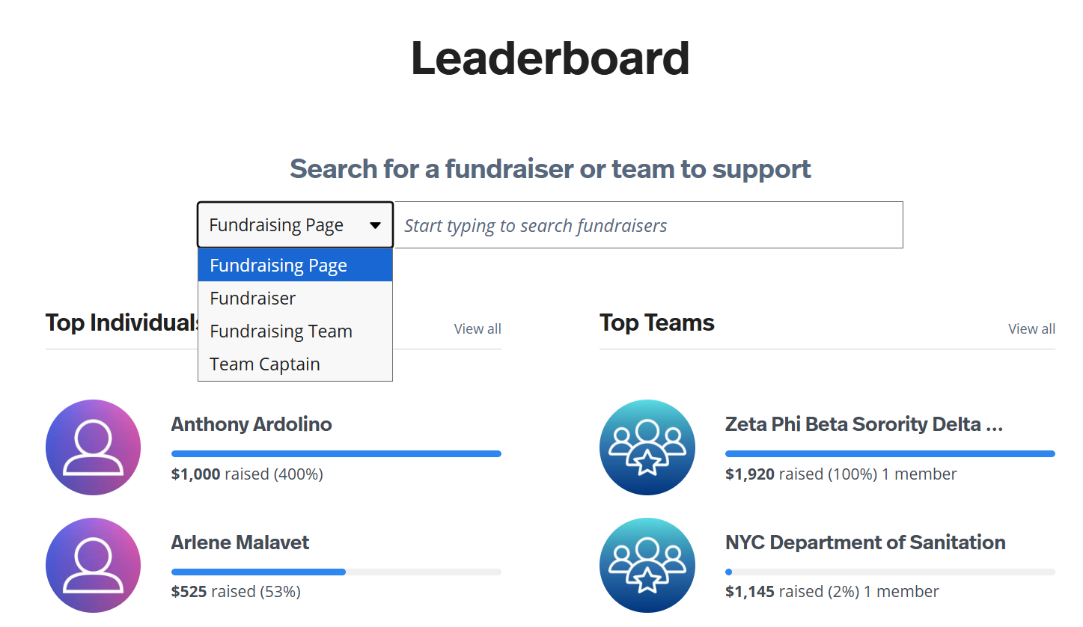
- Select ‘Leaderboard’
- Choose either Fundraising page, Fundraiser, Fundraising Team, or Team Captain from the drop down menu and type in their name.
- Once you have located the participant or team, click the page and select DONATE.
- If you wish for your donation to be credited towards a registered participant, you will need to place the donation directly on their individual or team fundraising page. You can search for the fundraiser here participating individual or team fundraising page. You can search for the participant or team the City’s Empower Website. Once you are on the Event website:
Revised Image: